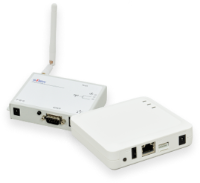


C-6200U

Software

Name Version Last Update Operating System(s) Content
CX User Software       click the link for this information   This includes setup utility and print client software.  
SX Virtual Link       click the link for this information   Latest version of utility for the USB scanner device connection. 
 

Please read the FAQ for this unit before you contact us. (upper right corner)

Windows 7 information

The C-6200U offically does not support Windows 7. Even if you can find SX-VL and CX-Print listed to be compatible with Windows 7 the C-6200U does not support Windows 7 and there is no support available for usage of C-6200U on Windows 7.

The up to date C-6700WG for example supports Windows 7.

Firmware

Download the version up utility:
1.Please download the below version up utility software if you are updating the existing firmware in your product. The utility files are self-expanding, self-executable formats

* If you are using Windows NT 4.0/2000/XP;
1.Be sure to install the packet driver contained in the version up utility files, following the setup Wizard instruction.
2.When you attempt to overwrite the packet driver in Windows 2000, you may be asked to reboot the operating system. Follow the instruction to reboot in order to complete the version up utility installation.
3.If you are using NT4.0, do not install the packet driver immediately after rebooting as it may cause a system error.
* The download file with the latest date contains the firmware for both "C-6200" and "C-6200U+." The version up utility automatically detects the model name and writes the corresponding firmware to the print server. Therefore, it can not write the incorrect firmware.

Version Update Content
2.3.1 (for C-6200U+)
1.7.0 (for C-6200U)
 
2008.09.18  The latest firmware 
 
Title Update Content
Manual    Manual C-6200U